Looking for a Scrivener alternative?
ForgeTales vs Scrivener
Scrivener has been the reference for long-form writing for almost two decades, and for good reason: its binder, corkboard and compiler changed the way novels get written. ForgeTales is not a copy of it. It is a worldbuilding app with a writing studio, Atelier, built inside, so your characters, timelines and lore sit beside the manuscript instead of in another program. Both work offline, both are a one-time purchase and neither uses AI. This page compares them point by point, including what Scrivener still does better.
The short answer
Choose Scrivener if you only need a manuscript tool, write screenplays or depend on its many export formats. Choose ForgeTales if your book depends on a world you are still building: Atelier gives you a binder, corkboard, snapshots and compile like Scrivener's, and adds character sheets, relationship maps, timelines, calendars and a lore wiki that the manuscript knows about. ForgeTales also runs on Linux and Android, where Scrivener has no version.
Side by side
| What matters | ForgeTales | Scrivener |
|---|---|---|
| Pricing model | Free plan, or a one-time purchase. No subscription. | One-time purchase per platform: $59.99 for macOS or Windows, $23.99 for iPhone and iPad |
| Works fully offline | Yes — 100% offline and private | Yes, it is a desktop app |
| Where your work lives | On your own device | On your device, as a .scriv project |
| Built for worldbuilding | Yes — characters, timelines, lore wiki, moodboards, calendars and a writing space | No. Built for long-form writing; character and setting sketches are text templates |
| Platforms | Desktop (Windows, macOS, Linux) and mobile (iOS, Android) | macOS, Windows, iPhone and iPad. No Android or Linux version |
| Manuscript tools | Atelier: binder, corkboard and kanban, a folder as one continuous text, split editor, snapshots, comments, focus and typewriter modes | Binder, corkboard, outliner, Scrivenings, split editor, snapshots, comments and composition mode. The reference in its field |
| Manuscript linked to your world | Yes. Detects characters and lore as you write and shows their sheets beside the page | By hand: document links, keywords and metadata that you keep up to date |
| Timelines and calendars | Built in: plot board, timelines and custom calendars | Not built in. Many writers pair it with Aeon Timeline |
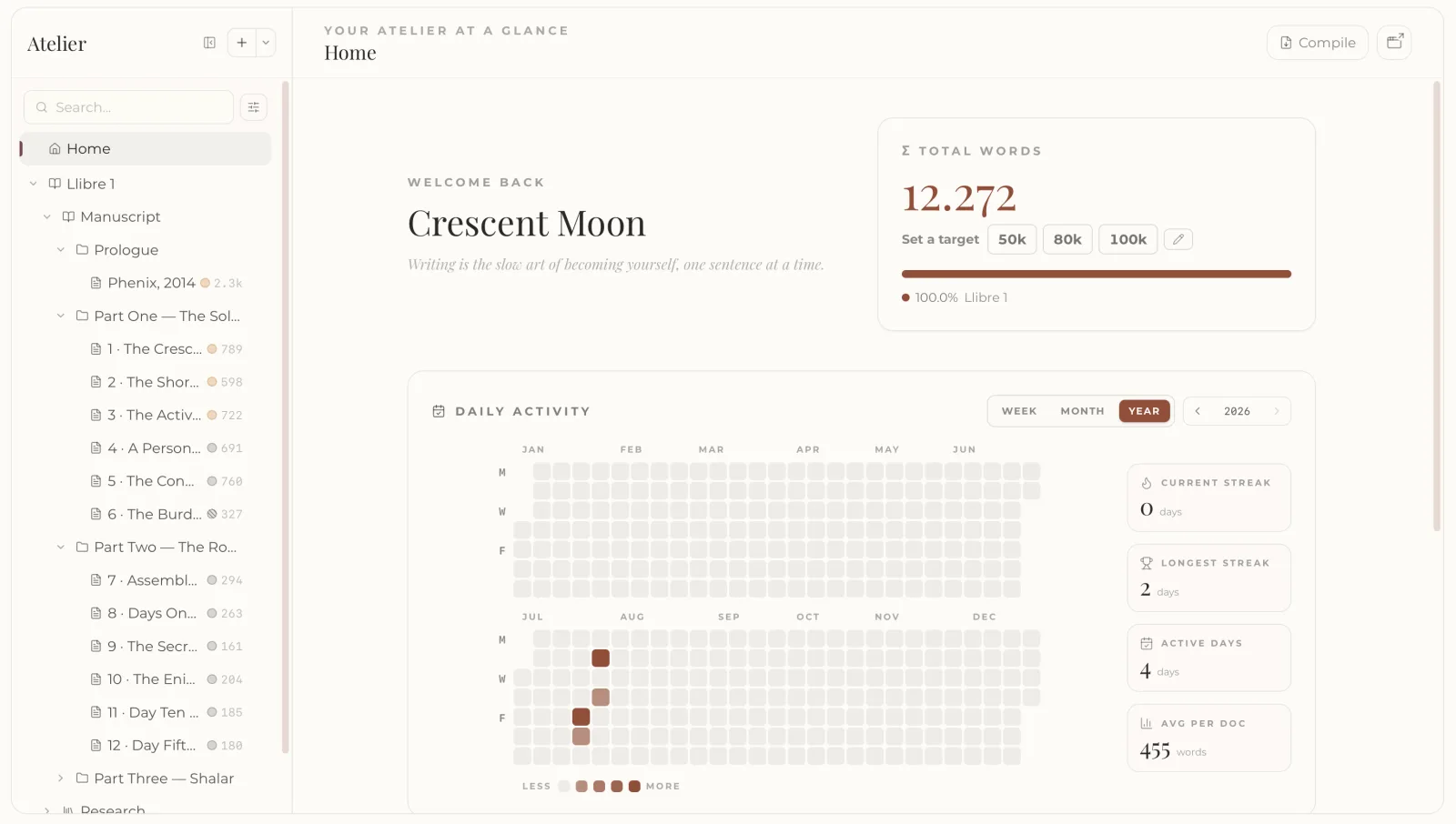
| Manuscript analytics | Word targets and streaks, readability, character presence by chapter and plot coverage | Project and session targets, writing history and text statistics |
| Export formats | EPUB, PDF and DOCX, with book templates and a live preview | Word, PDF, EPUB, RTF, plain text, Final Draft, Fountain and Markdown-based formats, among others |
| Screenplays | No screenplay formatting | Yes: script mode, plus Final Draft and Fountain export |
| Sync between devices | Optional, through your own Dropbox, Google Drive, OneDrive or iCloud Drive | Through Dropbox between a computer and an iPhone or iPad |
| What one license covers | Two devices at once, in any mix of computers, phones and tablets | Every computer in your household on one operating system; the other system and iOS are sold separately |
| Future versions | All future updates to what you bought are included | Updates within version 3 are free; major new versions are not included |
| Try before you buy | Free plan with no time limit; Atelier includes 10,000 words to try it | Free trial for 30 days of use |
| Generative AI | None | None |
Scrivener prices in US dollars, from Literature & Latte and the App Store, checked in November 2026. ForgeTales prices in euros on this website, before tax: Atelier €39.99, Founder €79.99, or both for €119.98.
Our honest take
Scrivener is the standard for long manuscripts, and it has earned it.
For almost twenty years, Scrivener has shown that a novel is not one long document but hundreds of scenes you need to move, compare and rewrite. Its binder, corkboard and compiler set the pattern most writing software follows today, and its one-time price respects writers.
What Scrivener does not try to be is a worldbuilding tool. Character and setting sketches are text documents, and timelines, family trees or calendars live in other programs. ForgeTales starts from the world and puts a writing studio with a binder, corkboard and compile inside it, so the manuscript knows who your characters are and when each event happens.
Writing the manuscript: Atelier and Scrivener
Scrivener's central idea is the binder: the book split into chapters and scenes that you reorder by dragging, with research and notes in the same project. Around it are the corkboard, where each document becomes an index card with its synopsis, the outliner, Scrivenings, which shows a whole folder as one text, snapshots of earlier versions and a split editor. Few programs offer such a complete set.
Atelier, the writing studio in ForgeTales, is built on the same ideas, because they work. Its binder has a Manuscript, a Research section and a Trash, and holds acts, chapters and scenes, front and back matter, and several books in one project. Any folder can be shown as a corkboard of cards, as a kanban board by status (draft, revising, final or stuck) or as one continuous text, like Scrivenings. You can split the editor to work on two documents at once, take snapshots and compare them word by word, leave comments in the margin, write in focus or typewriter mode and set a word target with a deadline.
Scrivener still goes further in sheer configurability: custom metadata, collections, keywords, document templates and options for almost any workflow. If your process depends on them, it is hard to beat. Atelier aims for a calmer interface, with the essentials ready from the first day.
Your world beside the manuscript
This is the biggest difference. In Scrivener, a character is a document you fill in from a template, and the program does not know that a name in chapter twelve belongs to that sketch. Writers who need more usually add other tools: Aeon Timeline for the chronology, a wiki or a notebook for the lore, a spreadsheet for invented words.
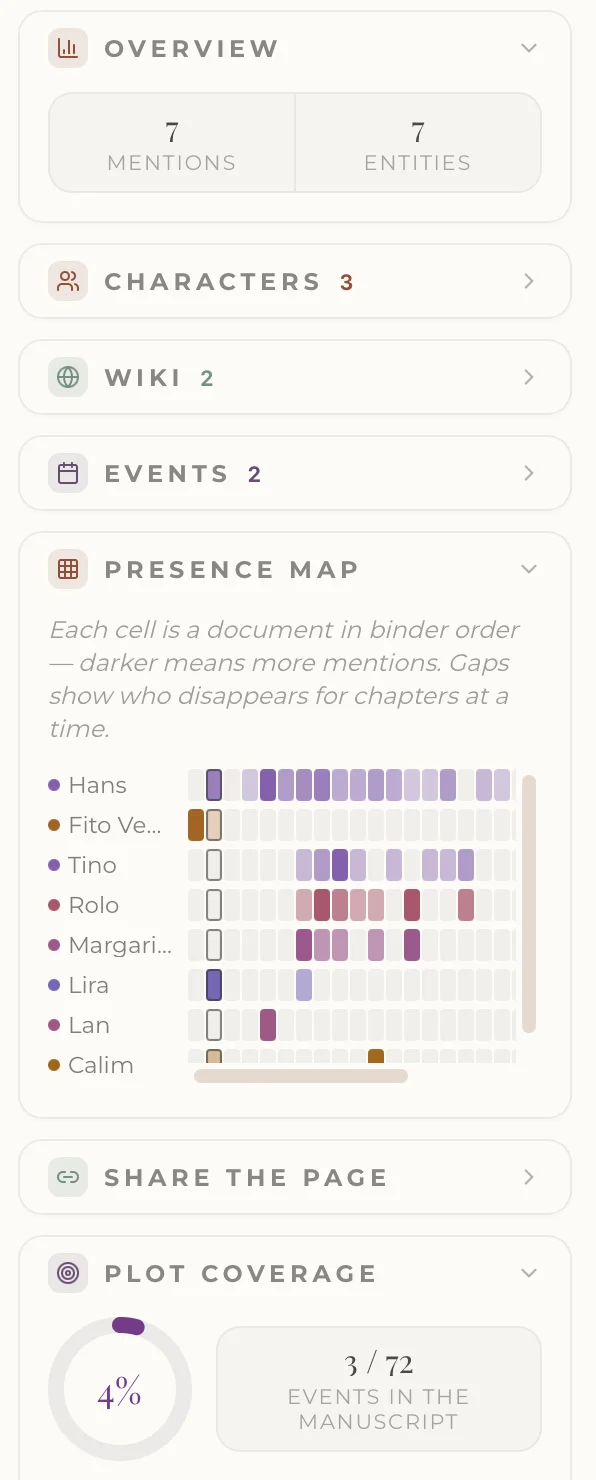
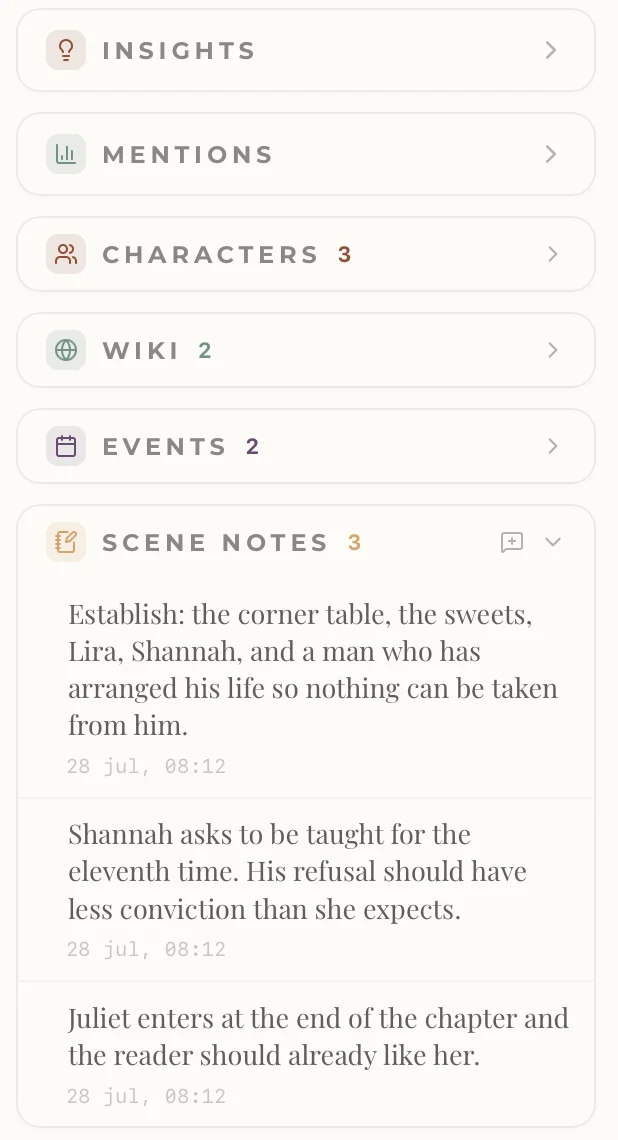
In ForgeTales the world comes first. Characters have sheets with relationship maps and family trees, events live on a plot board and on timelines tied to your own calendars, and places, factions or magic systems go into a wiki linked to everything else. When you write in Atelier, it detects the characters and lore you mention and shows their sheets beside the page, so checking an eye color or the date of a treaty takes one glance.
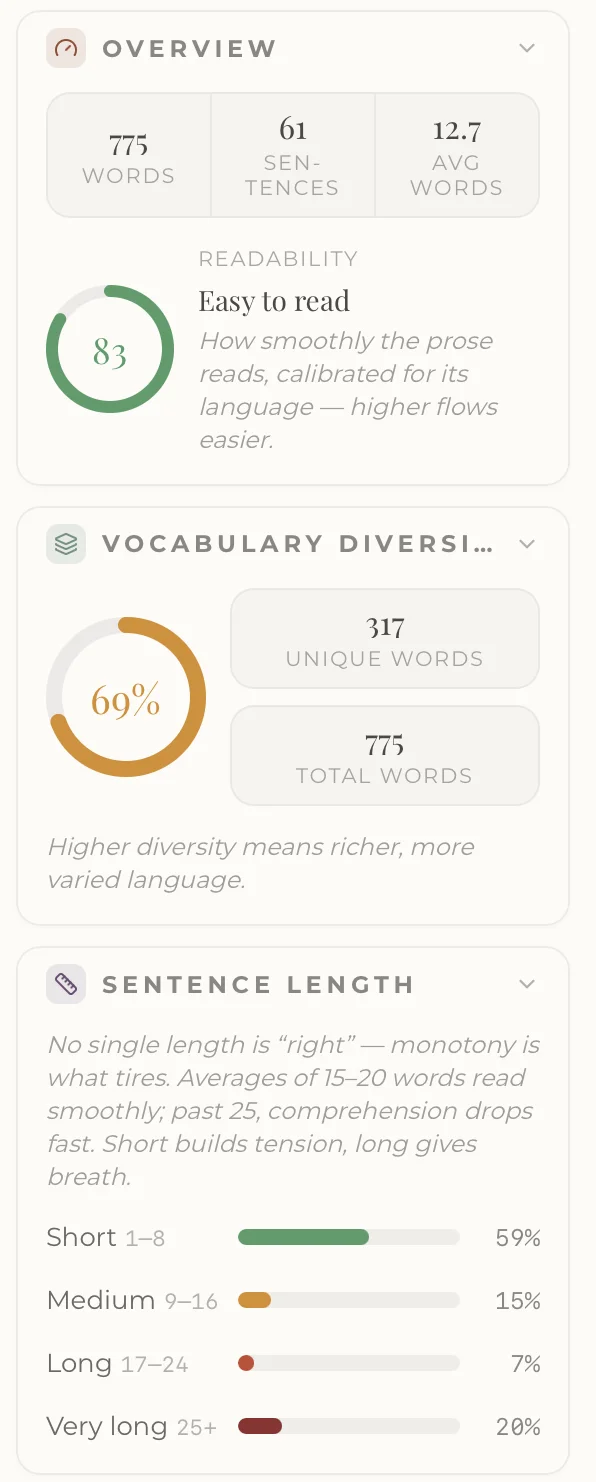
That connection also lets you measure the book. A presence map shows which characters appear in each chapter and who disappears for too long, plot coverage tells you how many of your planned events have reached the manuscript, and the lexicon collects the words your world invented, with their definitions, so the spellchecker stops flagging them.
From draft to book: compiling
Scrivener's compiler is one of the most powerful in any writing program. The same project can become a Word manuscript for an agent, a PDF for print, an EPUB, a screenplay or a LaTeX document, with formats you can adjust down to the last detail. That power comes with a learning curve: getting exactly the result you want often means time with the manual.
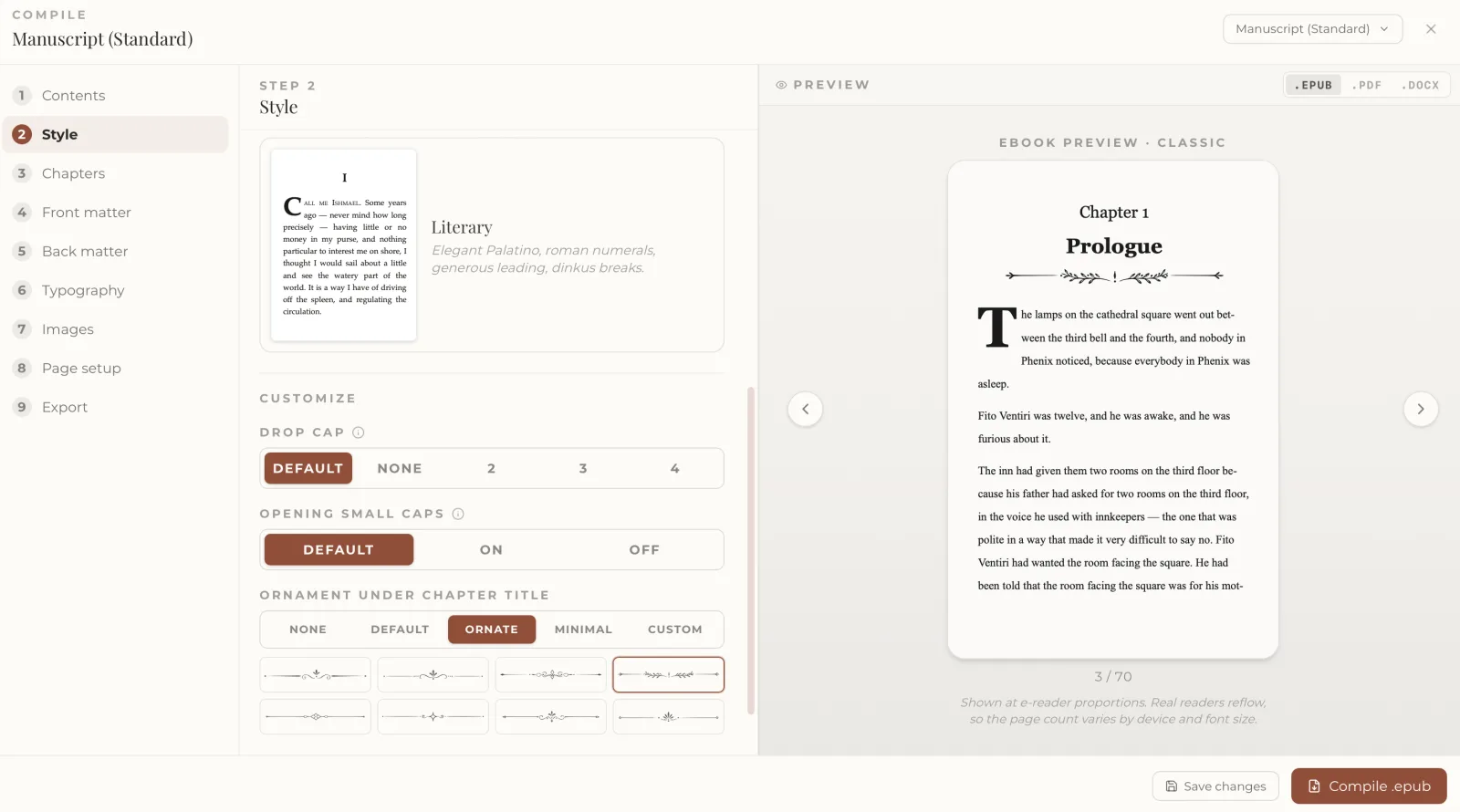
Atelier's compiler covers what most novelists need, with less to configure. You set the title, author and cover, choose which acts, chapters and front or back matter go in, pick a template with drop caps, small-caps openings and chapter ornaments, and adjust page size, margins, headers and numbering for PDF and Word. A live preview shows the ebook, the PDF, the .docx or a 3D book before you export to EPUB, PDF or DOCX.
What it does not do: screenplay formatting, or Final Draft and LaTeX output. If you need any of those, Scrivener is the better tool.
What each one costs
Neither is a subscription, which already sets both apart from most of the market. Scrivener is sold per platform: $59.99 for macOS, $59.99 for Windows ($95.98 for both) and $23.99 for iPhone and iPad on the App Store. A desktop license covers every computer in your household that runs that system, which is generous if you only use Macs or only Windows. Updates within version 3 are free; major new versions are not included in the license and have been sold as discounted upgrades.
ForgeTales has a free plan with no time limit: one world with room for 15 characters, 20 timeline events, 20 wiki notes and 25 moodboard elements. Atelier, the writing studio, costs €39.99 once, and your first 10,000 words are free. Founder, which removes every limit from the worldbuilding tools, costs €79.99, and both together cost €119.98. Each license works on two devices at once, in any mix of computers, phones and tablets, and every future update to what you bought is included. You can also pay in 3, 6 or 12 monthly installments; it is a payment plan, not a subscription.
So the answer depends on your devices and on what you need. If you only want a manuscript tool and work on several computers with the same system, Scrivener's household license covers all of them. If you mix Windows, Mac, Linux, iPad or Android, one ForgeTales license covers two devices on any of them. And if you also want character sheets, timelines and a wiki, the comparison is no longer like for like: Scrivener does not include them.
Platforms, mobile and sync
Scrivener runs on macOS, Windows, iPhone and iPad. There is no Android or Linux version, and Literature & Latte has not announced plans for either. To work on the same project from a computer and an iPad, you sync it through Dropbox, and on iOS you tap the sync button whenever you want to send or receive changes.
ForgeTales runs on Windows, macOS and Linux, and on iPhone, iPad and Android phones and tablets (Chromebooks too, through the Android app). Everything works offline. Sync is optional and goes through your own cloud: Dropbox, Google Drive, OneDrive or iCloud Drive, or, on a computer, any folder that another cloud service keeps in sync. ForgeTales has no server where your work is stored.
Privacy and AI: a tie
Here the two think alike. Scrivener keeps your projects on your own disk and contains no generative AI. ForgeTales does the same: your worlds and manuscripts stay on your device, nothing you write is sent to us or used to train AI, and the app has no ads or tracking. If privacy is why you are leaving a cloud tool, either one is a sound choice.
How to move from Scrivener to ForgeTales
You do not have to start over. ForgeTales cannot open a .scriv project directly, but Scrivener can export the binder as separate files, and Atelier turns them back into documents you can edit:
- In Scrivener, select your Draft folder (called Manuscript in some templates) or the folders you want to bring, and choose File > Export > Files. Pick Word (.docx) as the format for text files, so italics and other formatting come through. Scrivener recreates the binder's folders on disk.
- In Atelier, recreate your parts and chapters as folders inside Manuscript.
- Use the Import file button in the binder to bring the exported files into each folder. Files in .docx, .md, .txt or .html become editable documents; PDFs and images are kept as research attachments.
- Move your character and setting sketches into character sheets and wiki entries. If you keep those notes as Markdown files, ForgeTales can import them directly as characters or wiki entries.
- Check the order of the scenes and the word count, and keep your original .scriv project as a backup.
When Scrivener might suit you better
- You only need a manuscript tool and already keep your world somewhere else
- You write screenplays or need Final Draft, Fountain or LaTeX output
- Your workflow relies on custom metadata, collections and years of fine-tuning
- You work on several computers with the same system and want one household license for all of them
- You value almost two decades of tutorials, courses and books about the program
When ForgeTales is the better fit
- Your novel depends on a world: characters, timelines, places and invented words
- You want the manuscript to recognize your characters and show their sheets as you write
- You write on Linux or Android, or mix systems, and want one license that works across them
- You prefer a calmer interface, with corkboard, snapshots and compile ready from the first day
- You are planning a series or running tabletop campaigns in the same world
Frequently asked questions
Is ForgeTales a good Scrivener alternative?
Yes, especially if your book depends on worldbuilding. Its writing studio, Atelier, has the Scrivener tools most novelists use (binder, corkboard, a folder as one continuous text, split editor, snapshots and compile to EPUB, PDF and DOCX) and adds character sheets, timelines, calendars and a lore wiki connected to the manuscript. If you need screenplay formatting or a wide range of export formats, Scrivener remains the better choice.
Is there a version of Scrivener for Android or Linux?
No. Scrivener is available for macOS, Windows, iPhone and iPad, and Literature & Latte has not announced Android or Linux versions. ForgeTales runs on Windows, macOS, Linux, iOS and Android, and works offline on all of them.
Can I import a Scrivener project into ForgeTales?
Yes, after exporting it. In Scrivener, use File > Export > Files and choose Word (.docx); the export keeps the binder's folders. Then import the files into Atelier's binder, where they become editable documents. ForgeTales cannot open a .scriv project directly.
Does ForgeTales have a binder and corkboard like Scrivener?
Yes. Atelier's binder holds acts, chapters, scenes, research and front and back matter, and any folder can be shown as index cards, as a kanban board by status or as one continuous text, similar to Scrivenings. It also has a split editor, snapshots you can compare word by word, comments, and focus and typewriter modes.
Is ForgeTales cheaper than Scrivener?
It depends on your devices. Scrivener costs $59.99 per desktop system and $23.99 for iPhone and iPad, and a desktop license covers every computer in your household on that system. ForgeTales has a free plan; Atelier, its writing studio, costs €39.99 once and works on two devices on any system, with all future updates included. Both are one-time purchases, not subscriptions.
Do Scrivener or ForgeTales use AI?
Neither includes generative AI. Literature & Latte states that Scrivener contains no AI, and ForgeTales is AI-free by design: what you write stays on your device and is never used to train models.
Can I use ForgeTales and Scrivener together?
Yes. Some writers keep drafting in Scrivener and use ForgeTales for characters, timelines and lore. Atelier exports to DOCX, which Scrivener can import, and Scrivener exports files that Atelier can import, so moving text between the two is simple.
Try ForgeTales for free
Download the free plan and start building. No account required, no subscription — your worlds live on your machine, and they stay yours.
Download ForgeTales